
 sensors
Sensors
Motion, presence, contact, leak, air quality and weather sensors for Apple Home — organised by the job, because that is what decides which one you need.
33 products11 brands

Compare sensors
The 20 sensors whose specifications we have recorded. An em dash means we have not confirmed that detail yet, which is not the same as no. 10 of them have a current Amazon UK listing we could verify; the rest are catalogued for reference and may be discontinued or sold only through dealers.
Some links below are affiliate links: we may earn a commission if you buy through them, at no extra cost to you.
Showing 33 of 33 sensors
Some links below are affiliate links: we may earn a commission if you buy through them, at no extra cost to you.
sensors
sensors
sensors
sensors
sensors
sensors
sensors
sensors
sensors
sensors
sensors
sensors
sensors
sensors
sensors
sensors
sensors
sensors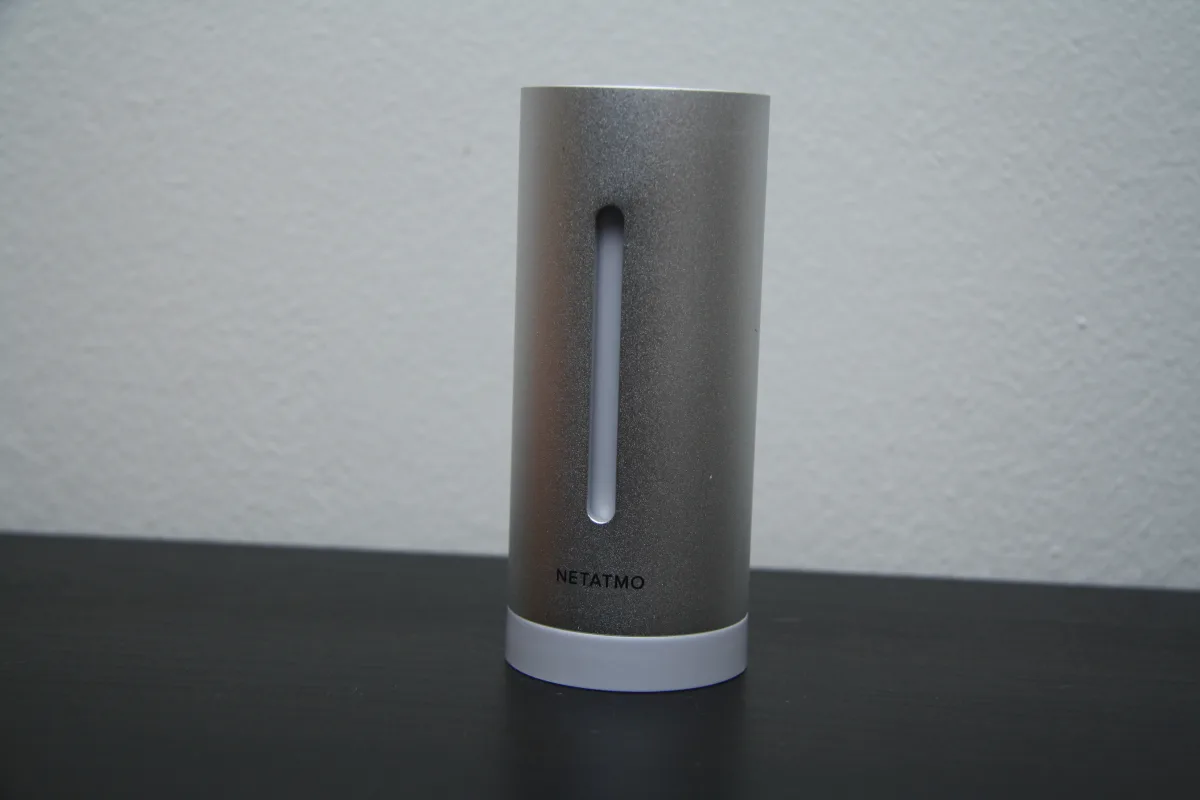 sensors
sensors
sensors
sensors
sensors
sensors
sensors
sensors
sensors
sensors
sensors
sensors
sensors
sensors
sensors
sensors
sensors
sensors
sensors
sensors
sensors
sensors
sensors
sensors
sensors
sensors
sensorsNo sensors match these filters.
Some links below are affiliate links: we may earn a commission if you buy through them, at no extra cost to you.
Sensors are the accessories that turn a collection of smart devices into a home that does things by itself. A light you switch on from your phone is a novelty. A light that comes on because you walked into a dark room, and goes off again when you leave, is the thing people actually wanted.
Before the recommendations, the one requirement that catches people out: a sensor does nothing without a home hub. A HomePod or an Apple TV has to be at home, powered on, to run the automation the sensor triggers. Without one you can look at the sensor’s reading on your phone and nothing else will ever happen. This is the most common reason a first sensor purchase disappoints.
Which sensor solves your problem?
- Motion — someone moved. Cheap, battery-friendly, and it stops seeing you when you sit still.
- Presence — someone is there, moving or not. Radar rather than infrared, mains powered, more money.
- Contact — a door or window is open or shut.
- Leak — water where it should not be.
- Air quality, temperature and humidity — a number to automate on, and a number to look at.
Motion and presence
The light that stops switching itself off: Aqara Presence Sensor FP2
The Aqara Presence Sensor FP2 uses 60 GHz millimetre-wave radar instead of the passive infrared in an ordinary motion sensor, so it keeps seeing a person who is sitting still — at a desk, on a sofa, asleep. That single difference removes the most irritating failure in home automation: the light that goes out because you stopped waving your arms. It also divides a room into zones and reports each one separately.
It is mains powered, which is the trade. Radar sensing costs more energy than a battery can supply, so the FP2 needs a USB socket within reach.
The ordinary motion sensor, done well: Eve Motion
The Eve Motion joins over Thread, needs no bridge and no manufacturer account, and runs on batteries so it goes wherever you want it. For a hallway, a landing or a cupboard — anywhere people pass through rather than settle — passive infrared is the right tool and costs a fraction of a presence sensor.
Motion plus a light reading: Qingping Motion & Light Sensor T
The Qingping Motion & Light Sensor T puts an ambient light sensor alongside the motion detector, and the T marks the Thread version. That second reading is the point: an automation can check the room is actually dark before it turns a lamp on, so the hall light stops coming on at noon every time somebody walks past.
Doors and windows
Eve Door & Window
The Eve Door & Window is a two-part magnetic contact sensor on Matter over Thread, with no hub of its own and no account to create. It is the sensor to buy for “tell me if the back door is open”, for lights that come on when a wardrobe opens, and for the automation that turns the heating off when a window is left open.
Water
Eve Water Guard
The Eve Water Guard is the cheapest insurance in this directory. It uses a sensing cable rather than a single point probe, so it can be run along the back of a washing machine or around a boiler and detect a leak anywhere on its length — which is a good deal better than hoping the puddle forms exactly where you put the sensor.
Air quality, temperature and weather
Indoors, on a budget: Qingping Air Monitor Lite
The Qingping Air Monitor Lite reports air quality into the Home app where other accessories can act on it — the reading is a trigger, not just a display, which is the whole reason to buy a HomeKit monitor rather than a cheaper standalone one.
The Kaiterra Laser Egg 2+ adds TVOC and CO2 to that, which is the fuller picture if you are trying to work out why a room feels stale rather than only that it does. We have no buy link for it: the Amazon UK listing under this name is the older base Laser Egg, which measures particulates only, so buy the 2+ direct from Kaiterra rather than following a search result to the wrong model.
Temperature and humidity, indoors or out: Eve Weather
The Eve Weather is a small weather-resistant unit on Thread that reports temperature, humidity and barometric pressure. Put it outside and your heating automations can react to the actual weather rather than to a forecast for the nearest city.
The full station: Netatmo Smart Home Weather Station
The Netatmo Smart Home Weather Station is the two-module system — indoor and outdoor — reporting temperature, humidity, CO2 and noise, and it is what people are looking for when they search for a HomeKit weather station by name. It is Wi-Fi rather than Thread and it uses a Netatmo account.
The Netatmo Smart Indoor Air Quality Monitor is the indoor module on its own. Check price on Amazon UK
Smoke
Netatmo Smart Smoke Alarm
The Netatmo Smart Smoke Alarm sends an alert to your phone when it goes off, which is the entire argument for a connected smoke alarm: a conventional one protects a house that somebody is standing in.
Treat it as an addition to a properly specified smoke alarm layout, not a replacement for one. UK guidance on how many alarms a home needs and where they go does not change because an alarm has Wi-Fi in it.
What to check before you buy
Thread, Bluetooth or a bridge. Thread sensors respond quickly, use very little power and need a Thread border router — which any recent HomePod or Apple TV already is. Bluetooth-only sensors work but are slower and shorter-ranged. Zigbee sensors are cheap and need the manufacturer’s hub, which is a second box and a second thing that can stop being supported.
Battery type and how you replace it. Most of these run on coin cells or AAAs for a year or more. Six sensors is six batteries a year, and a sensor whose battery is awkward to change is a sensor that ends up flat. Check that Apple Home shows you the battery level — the good ones do, and it is the difference between a warning and a surprise.
PIR or radar, decided by the room. Passive infrared detects change; radar detects presence. In a corridor, PIR is correct and cheaper. In a room where people sit still — a study, a living room, a bedroom — PIR will keep switching the lights off on you and no amount of tuning fixes it properly.
Where the sensor will physically sit. Motion sensors want a corner with a clear view and no radiator or sunlit wall in frame. Contact sensors need the two halves to line up within a few millimetres on a door that moves. Look at the actual spot before ordering, not after.
What the reading is for. A sensor that only shows a number in an app is a gauge. The reason to buy a HomeKit one is that the number becomes a trigger — humidity above 60% starts the extractor, temperature below 5°C outside warns about pipes. If nothing is going to act on it, a cheaper non-HomeKit sensor does the same job.
A home hub, again. It is the requirement people skip, so it is worth saying twice: no HomePod or Apple TV, no automations.
The full list of HomeKit-compatible sensors in the directory is below, filterable by connectivity and brand.